
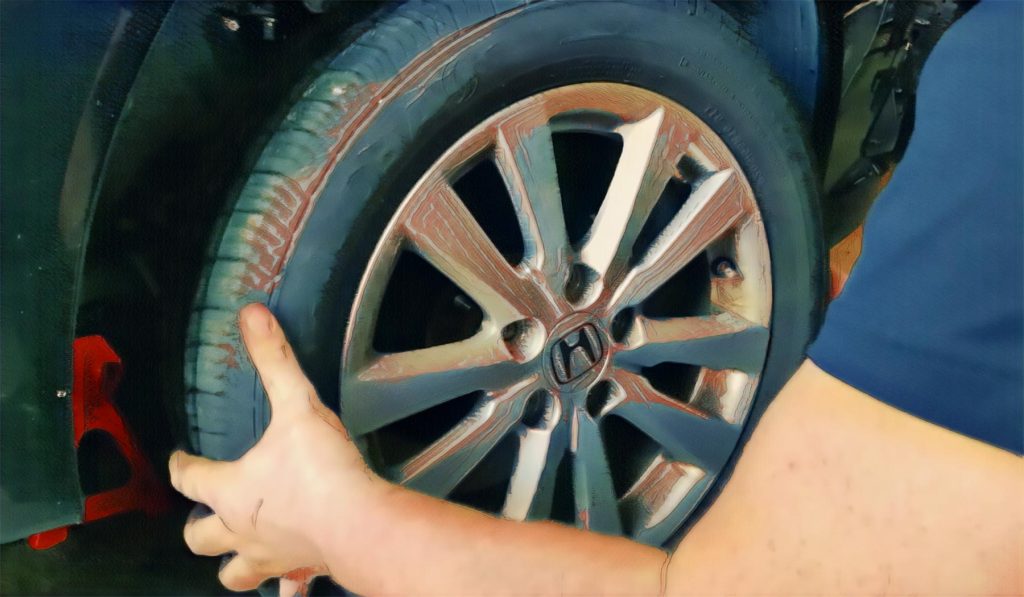
Does your vehicle make a screeching sound when you apply the brakes, or does the pedal seem softer than usual? Your 2012–2017 Honda Civic’s brake pads are probably due for replacement. If you own a Honda, you may be able to fix the brake pads yourself. In this post, we’ll teach you how to unscrew, clean, and reinstall the pads so you can fix your car in no time. In addition, we will provide helpful details on what tools to use, how to be cautious, and what to do for upkeep thereafter.
Before moving forward, please take a look at the following list below, in which you can find Your Honda’s Civic model for this tutorial:Â
- Honda Civic 2012
- Honda Civic 2013
- Honda Civic 2014
- Honda Civic 2015
- Honda Civic 2016
- Honda Civic 2017
Â
The following equipment is required to change the brake pads:
- A safety rail system, a hydraulic jack
- Socket wrench set, including metric and standard sizes
- An enormous c-clamp
- Copper or silicone brake lubricant brake cleaning
- A bristle brush
- A set of screwdrivers
- Protective work gloves
- Eye protection
Precaution Tips
Safety considerations should be kept in mind prior to beginning the brake pad repair process, here we´ll give you a few:Â
- Â While the jack is the only support under the vehicle, you should never work underneath it.
- For extra stability, use extra safety supports.
- Â Be careful not to breathe in too much brake cleaner.
- Put on your protective eyewear and work gloves.
- Make sure the brake lines are not overly stretched or left dangling.
- Rusty or corroded tools should not be used.
Before you begin, make sure you have the right tools and follow these safety steps to ensure successful results:
- Wear appropriate clothing, including gloves and safety glasses
- Make sure the vehicle is on a level surface
- Disconnect the battery before starting work
- Do not work under the vehicle when it is raised without adequate supports
Here is a rundown of everything you’ll need to fix the brake pads:
- Pipe wrench set
- Impact gun
- Hydraulic jack
- Caliper press
- brake grease
Transparency and pofessionalism
are at the forefront of all our
Mobile Brake Services.
Honda Civic 1.8L Brake Pad Removal and Installation
Honda Civic 9th Gen Brake Pads Removal
Frequent inhalation of brake pad dust, regardless of material composition, could be hazardous to your health.
- Avoid breathing dust particles.
- Never use an air hose or brush to clean brake assemblies. Use an OSHA-approved vacuum cleaner.
NOTE: The caliper type is different by grade. Do the removal procedure by the applicable caliper type according to the table.
1. Vehicle Lift
- Raise the vehicle on a lift, and make sure it is securely supported.
2. Brake Fluid (Remove)
- Remove some brake fluid from the master cylinder.
3. Front Wheel
- Remove both front wheels.
4. Front Brake Pad
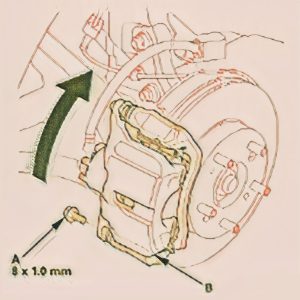
- Remove the flange bolt (A)
- Pivot the caliper body (B) up out of the way
Â
NOTE: Be careful when pivoting the caliper body up or the spring could pop out of position.
Check the hose and pin boots for damage and deterioration.
- Remove the pad return springs (A).
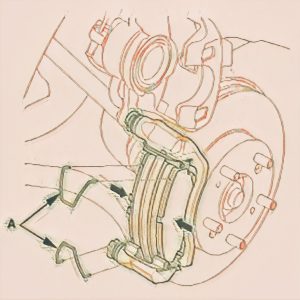
- Remove the pad shims (A) and the brake pads (B).
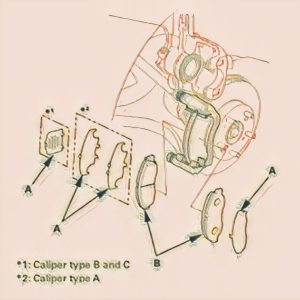
5. Front Brake Pad Retainer and Caliper Bracket Clean and Check
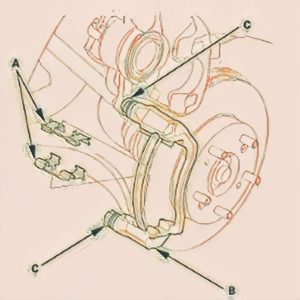
- Remove the pad retainers (A). NOTE: The upper and lower pad retainers are different. During installation, make sure the pad retainers are in the proper positions (caliper type B and C)
- Clean the caliper bracket (B) thoroughly; remove any rust, and check for grooves and cracks
- Verify that the caliper pins (C) move in and out smoothly. Clean and lube the pins if needed.

broward county
Honda Civic 9th Gen Brake Pads Installation
Frequent inhalation of brake pad dust, regardless of material composition, could be hazardous to your health.
- Avoid breathing dust particles.
- Never use an air hose or brush to clean brake assemblies. Use an OSHA-approved vacuum cleaner.
NOTE: The caliper type is different by grade. Do the installation procedure by the applicable caliper type according to the table.
1. Front Brake Pad Retainer and Caliper Bracket Clean and Check
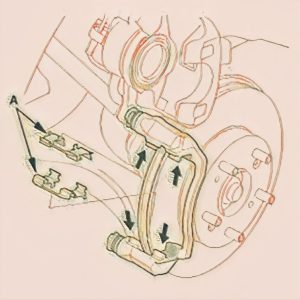
- Apply a thin coat of M-77 assembly paste (P/N 08798-9010) to the retainer mating surface of the caliper bracket (indicated by the arrows)
- Install the pad retainers (A).
NOTE: Wipe off the excess assembly paste from the retainers. Keep the assembly paste away from the brake disc and the brake pads.
Caliper type B and C: Make sure that the pad retainers are installed correctly.
- Install the brake caliper piston compressor tool
- Press in the piston with the brake caliper piston compressor tool.
Â
NOTE: Be careful when pressing in the piston; brake fluid might overflow from the master cylinder’s reservoir. If brake fluid gets on any painted surface, wash it off immediately with water
- Make sure the piston boot is in position to prevent damaging it when pivoting the caliper body down
- Remove the brake caliper piston compressor tool.
2. Front Brake Pad
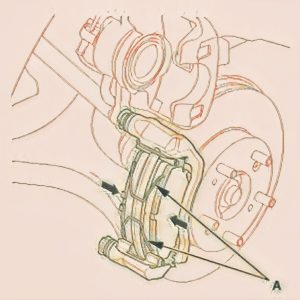
- Apply a thin coat of M-77 assembly paste (P/N 08798-9010) to the pad side of the shims (A), the back of the brake pads (B), and the other areas indicated by the arrows. NOTE: Wipe off the excess assembly paste from the pad shims and brake pads friction material
- Install the brake pads and the pad shims. NOTE: Install the brake pad with the wear indicator (C) on the upper inside position.
3. Install the pad return springs (A).

- Pivot the caliper body (A) down into position
- Install the flange bolt (B)
- Press the brake pedal several times to make sure the brakes work.
NOTE: Engagement may require a greater pedal stroke immediately after the brake pads have been replaced as a set. Several applications of the brake pedal will restore the normal pedal stroke.
4. Front Wheel
- Install both front wheels.
NOTE: Before installing the wheel, clean the mating surfaces between the brake disc and the inside of the wheel.
5. Brake Fluid (Refill)
- Add brake fluid as needed.
Honda Civic 1.8L Brake Pad Removal and Installation
A few more things you may do to maintain your Honda Civic’s brakes in good working order after the brake pad replacement is finished:
Â
- To ensure the brakes are functioning correctly, go for a test drive.
- If you hear a grinding or squeaking sound when applying the brakes, it’s time to check them out.
- In the hundred kilometers following the repair, do not brake suddenly.
- To keep dust and grime from accumulating on your brakes, clean them occasionally.
Â
If you own a 2012–2017 Honda Civic, you should be able to fix the brake pads without any problems using this tutorial. Stay safe by following safety precautions, and keep up with routine maintenance to keep your brakes and automobile in good repair for longer. Hiring a professional is the way to go if you are not comfortable fixing the problem on your own.
Brake systems, master cylinders, AA batteries, brake pads, and more are all areas of expertise at AutoTech Mobile. On top of that, they come to your house to do the service, so you won’t have to spend a dime or endure any unnecessary wait times at service centers or mechanical workshops. They are very knowledgeable about the most popular car manufacturers and provide individualized service.