
WARNING: Refer to Brake Dust Warning. Refer to Brake Fluid Irritant Warning.
NOTE: Always replace disc brake pads in axle sets.
- Inspect the fluid level in the brake master cylinder reservoir.
- If the brake fluid level is midway between the maximum-full point and the minimum allowable level, no brake fluid needs to be removed before proceeding.
- If the brake fluid level is higher than midway between the maximum-full point and the minimum allowable level, remove brake fluid to the midway point before proceeding.
- Raise and support the vehicle. Refer to Lifting and Jacking the Vehicle .
- Remove the tire and wheel assembly. Refer to Tire and Wheel Removal and Installation .
- Place a large C-clamp over the brake caliper body and against the outer brake pad.
- Using the C-clamp, compress the brake caliper piston fully into the brake caliper bore.
- Using a backup wrench to hold the brake caliper guide pin stationary, remove the lower brake caliper guide pin bolt (1)
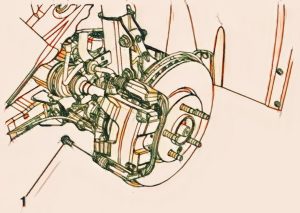
NOTE:- DO NOT use any air tools to remove or install the guide pin bolts. Use hand tools ONLY.
- Install an open end wrench to hold the caliper guide pin in line with the brake caliper while removing or installing the caliper guide pin bolt. DO NOT allow the open end wrench to come in contact with the brake caliper. Allowing the open end wrench to come in contact with the brake caliper will cause a pulsation when the brakes are applied.
- Rotate the brake caliper upward and support it with heavy mechanics wire.
CAUTION: Support the brake caliper with heavy mechanical wire, or equivalent, whenever it is separated from its mount and the hydraulic flexible brake hose is still connected. Failure to support the caliper in this manner will cause the flexible brake hose to bear the weight of the caliper, which may cause damage to the brake hose and in turn may cause a brake fluid leak.
- Remove the inner brake pad (1)
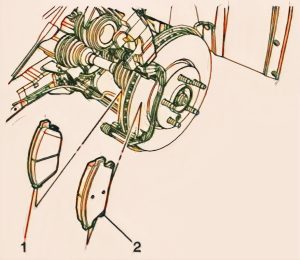
NOTE: Note the location of the brake pad wear sensor for correct installation. - Remove the outer brake pad (2).
- Remove the upper and lower brake pad springs (1)
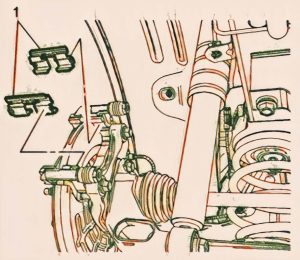
- If installing new brake pads, discard the brake pad springs.

- Thoroughly clean the contact surfaces of the brake caliper bracket of any corrosion or debris.
- Install the upper and lower brake pad springs (1)
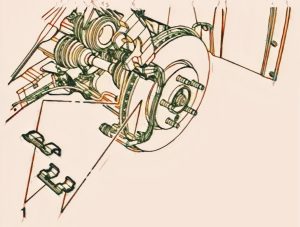
NOTE: If installing new brake pads, install new brake pad springs.
- Install the inner brake pad (1)
NOTE: Note the location of the brake pad wear sensor for correct installation. - Install the outer brake pad (2).
- Position the brake caliper over the brake pads and to the caliper bracket.
- Using a backup wrench to hold the brake caliper guide pin stationary, install the lower brake caliper guide pin bolt (1) and tighten to 28 (21 lb ft).
CAUTION: Refer to Fastener Caution. - Install the tire and wheel assembly. Refer to Tire and Wheel Removal and Installation
- With the engine OFF, gradually apply the brake pedal to approximately 2/3 of its travel distance.
- Slowly release the brake pedal.
- Wait 15 seconds, then repeat steps 8-9 until a firm brake pedal is obtained. This will properly seat the brake caliper piston and brake pads.
- Fill the master cylinder reservoir. Refer to Master Cylinder Reservoir Filling .
- Burnish the brake pads and rotors. Refer to Brake Pad and Rotor Burnishing.
Repairing the brake pads on a 2014 Chevrolet Trax 1.4L is critical for driving safety. Following the recommendations and precautions outlined in this article will help you to properly maintain your brake system, extend the life of your brake pads, and avoid costly last-minute repairs.
WARNING: Refer to Brake Dust Warning .
- Inspect the fluid level in the brake master cylinder reservoir.
- If the brake fluid level is midway between the maximum-full point and the minimum allowable level, no brake fluid needs to be removed before proceeding.
- If the brake fluid level is higher than midway between the maximum-full point and the minimum allowable level, remove brake fluid to the midway point before proceeding.
- Raise and support the vehicle. Refer to Lifting and Jacking the Vehicle .
- Remove the tire and wheel assembly. Refer to Tire and Wheel Removal and Installation .
- Using a backup wrench to hold the brake caliper guide pin stationary, remove the upper brake caliper guide pin bolt (1).
NOTE:
- DO NOT use any air tools to remove or install the guide pin bolts. Use hand tools ONLY.
- Install an open end wrench to hold the caliper guide pin in line with the brake caliper while removing or installing the caliper guide pin bolt. DO NOT allow the open end wrench to come in contact with the brake caliper. Allowing the open end wrench to come in contact with the brake caliper will cause a pulsation when the brakes are applied.
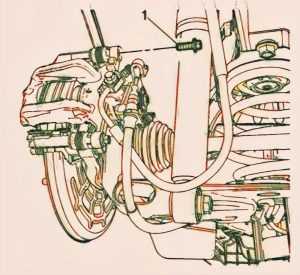
- Rotate the brake caliper downward and support with heavy mechanics wire
CAUTION: Support the brake caliper with heavy mechanical wire, or equivalent, whenever it is separated from its mount and the hydraulic flexible brake hose is still connected. Failure to support the caliper in this manner will cause the flexible brake hose to bear the weight of the caliper, which may cause damage to the brake hose and in turn may cause a brake fluid leak. - Remove the outer brake pad (1)
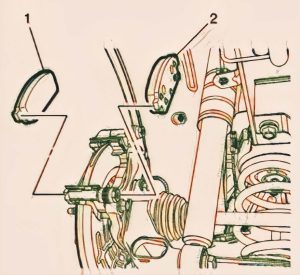
- Remove the inner brake pad (2).
NOTE: The inner brake pad is equipped with the wear sensor. - Remove the upper and lower brake pad springs (1)
- Thoroughly clean the contact surfaces of the brake caliper bracket of any corrosion or debris.
- Install the upper and lower brake pad springs (1).
- Install the outer brake pad (1)
- Install the inner brake pad (2)
- Using an appropriate brake caliper piston spanner tool, slowly rotate the brake caliper piston clockwise while applying inward pressure to the brake caliper piston until the piston is fully seated in the brake caliper housing.
- Ensure the notches in the brake caliper piston align correctly with the pins on the inner disc brake pad.
- Position the brake caliper over the brake pads and to the caliper bracket.
- Using a backup wrench to hold the brake caliper guide pin stationary, install the upper brake caliper guide pin bolt (1) and tighten to 28 N.m (21 lb ft).
- Install the tire and wheel assembly. Refer to Tire and Wheel Removal and Installation .
- With the engine OFF, gradually apply the brake pedal to approximately 2/3 of its travel distance.
- Slowly release the brake pedal.
- Wait 15 seconds, then repeat steps 8-9 until a firm brake pedal is obtained. This will properly seat the brake caliper piston and brake pads.
- Fill the master cylinder reservoir. Refer to Master Cylinder Reservoir Filling .
- Burnish the brake pads and rotors. Refer to .